National ID Digital 2026: How to Get and Download Your Digital National ID
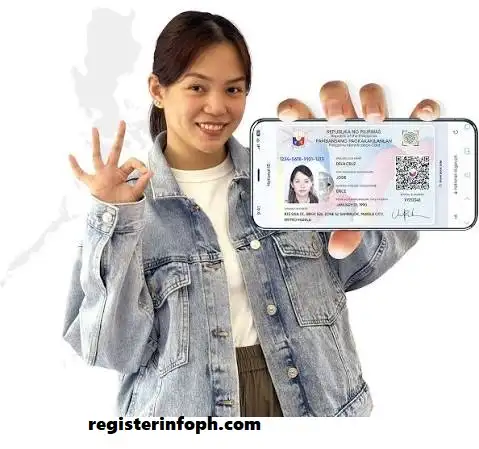
If you have already registered for the Philippine National ID, you do not always have to wait for or carry the physical card to prove your identity. The National ID Digital format gives registered Filipinos a convenient way to access their National ID using a smartphone or other supported device.
The Philippine Statistics Authority (PSA) recognizes the Digital National ID as a valid and sufficient proof of identity and age, subject to proper authentication. It has the same functionality and validity as the other National ID formats and can be used in government and private transactions that require proof of identity.
The National ID Digital version can be accessed through the eGovPH app, while the official National ID website also provides access to the digital version. The process uses your registered information and facial verification to help confirm that the person accessing the ID is the rightful holder.
In this guide, you will learn what the National ID Digital format is, who can access it, how to get it, what information it contains, where you can use it, how to verify it, and what to do if you experience problems.
For more helpful guides on government services, online registrations, and official application processes, visit Register Info PH
What Is the National ID Digital Format?
The National ID Digital format is the official electronic version of the Philippine National ID. It was launched by the Philippine Statistics Authority in partnership with the Department of Information and Communications Technology (DICT) to make National ID access more convenient and secure.
Unlike the physical National ID card, the digital version can be accessed using a smartphone or computer with an internet connection. It is intended to provide registered individuals with readily available proof of identity without requiring them to carry the physical card everywhere.
The PSA states that the Digital National ID has the same validity and functionality as the physical National ID and the National ID in paper format. It can therefore be presented for transactions requiring proof of identity and age, subject to authentication.
The National ID system now recognizes three main formats:
- National ID Card
- National ID in paper format
- Digital National ID

The PSA officially adopted the term National ID for these formats as part of its rebranding of the Philippine Identification System.
Who Can Get a Digital National ID?
The National ID Digital version is intended for individuals who have successfully registered with the National ID System.
There is no separate National ID registration process specifically for the digital version. In other words, you do not register for the digital ID as a completely separate identification document.
If your National ID registration has been successfully processed and your record is available, you can attempt to access your digital copy through the official channels.
The PSA has encouraged registered Filipinos to access their Digital National ID because it can provide a convenient and readily available form of identification. As of July 13, 2025, more than 88 million Digital National IDs were already accessible through the eGovPH app.
You can also check the latest posts on Register Info PH for more updated guides, registration tips, and online service information.
What You Need Before Getting Your Digital National ID
Before trying to access your National ID Digital copy, make sure you have the following:
- A completed National ID registration
- Your correct registered personal information
- A smartphone or computer
- Internet access
- A working camera if facial verification is required
- Access to the official National ID website or eGovPH app
You should also make sure that your name and date of birth are entered exactly as they appear in your National ID record.
The digital access process uses identity verification, including facial authentication, to help make sure that the ID is being accessed by the registered individual.
How to Get Your National ID Digital Copy Online
One of the main ways to access your National ID Digital copy is through the official National ID website.
Step 1: Open the Official National ID Website
Go to the official National ID website:
Be careful when searching for the service online. Because your National ID contains sensitive personal information, use the official government website rather than an unfamiliar website claiming to provide the ID.

Step 2: Enter Your Personal Information
Follow the instructions displayed on the website.
You may be asked to provide information such as your:
- First name
- Middle name
- Last name
- Date of birth
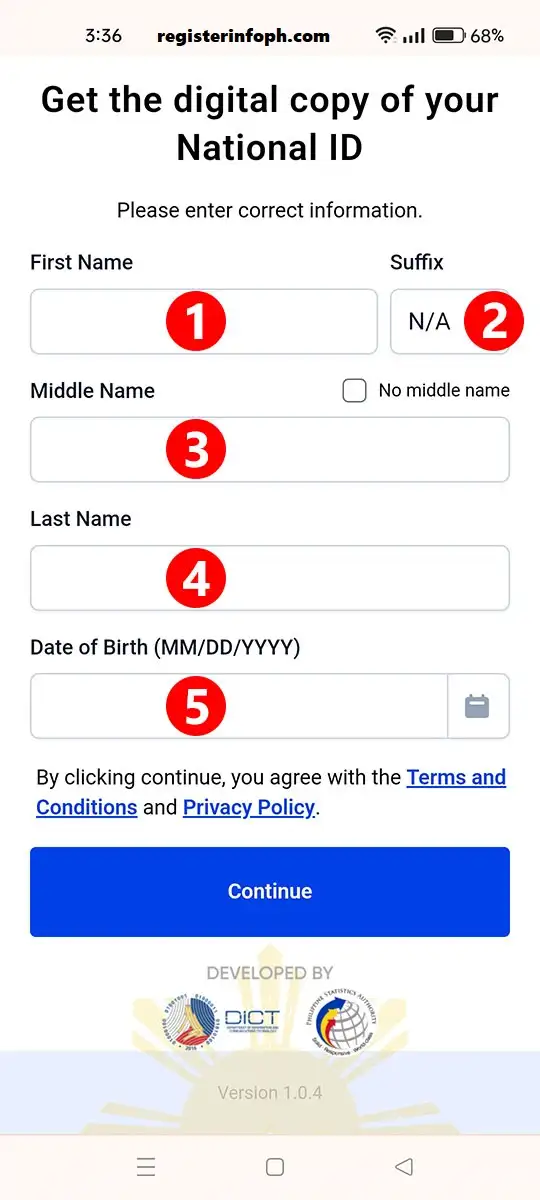
Make sure the information matches the details associated with your National ID registration.
Step 3: Start the Liveness or Facial Verification
The system may ask you to complete a liveness check.
This process uses your device’s camera to verify that you are a real person and help match your face with the information in the National ID system.
Follow the instructions shown on your screen. You may be asked to position your face correctly and remain still during part of the verification process.

Step 4: Complete the Verification
After completing the facial verification, the system will process your information.
If your information and facial verification are successfully matched, you can proceed to view your Digital National ID.
If the verification fails, do not repeatedly submit incorrect information. Instead, check your details, internet connection, camera, and lighting before trying again.
Step 5: View Your ID
After successful verification, select the option to view your National ID.
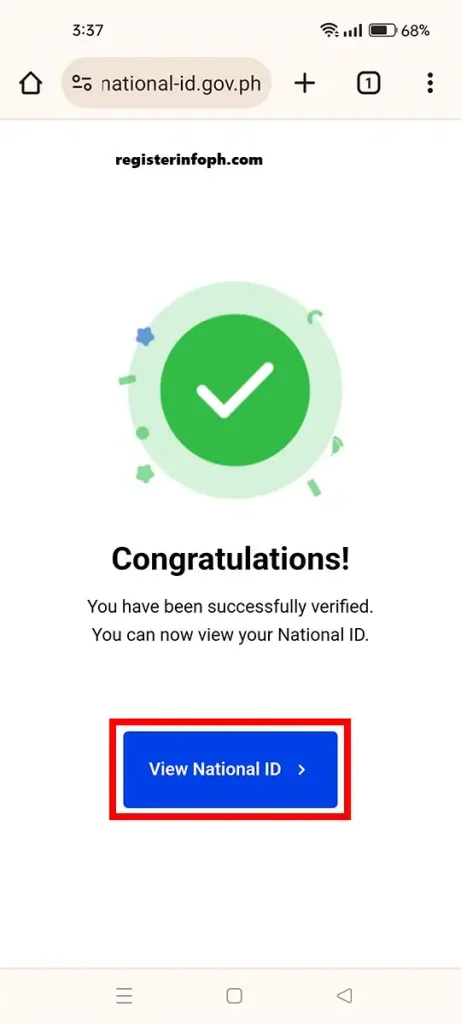
Your digital ID will appear on the screen with the information associated with your National ID record.
Step 6: Save Your Digital Copy
Once you can view the ID, you may save a personal copy according to the available options.
The PSA has also stated that registered citizens may take a screenshot of their digital ID for personal use.
However, keeping your digital ID within the official app or using the official access method can provide a more secure and convenient way to access it.
How to Access Your Digital National ID Through eGovPH
Another important way to access the National ID Digital version is through the eGovPH app.
The PSA has promoted eGovPH as a convenient way for registered individuals to access their digital ID from a mobile device.
To use the app:
- Download the official eGovPH app from the appropriate app store.
- Create an account or sign in if you already have one.
- Complete the required account verification.
- Open the Digital National ID section.
- Follow the instructions provided by the app.
- Complete the required identity or facial verification.
- Access your ID after successful verification.
The exact screens and prompts may change as the government updates the app, so always follow the instructions displayed in the current version of eGovPH.
How the Facial Verification Process Works
Facial verification is an important part of accessing your National ID Digital copy.
The purpose is to help establish that the person requesting access is the same person associated with the National ID record.
During the process, your device camera may be used to capture a live image of your face. You may receive instructions to position yourself in the center of the camera view or remain still while the system completes the verification.
For a smoother process:
- Use a stable internet connection.
- Make sure your camera lens is clean.
- Stay in a reasonably well-lit area.
- Follow the on-screen instructions carefully.
- Avoid moving unnecessarily during the verification.
- Enter your registered information accurately.
If the system cannot verify you, this does not automatically mean that you are not registered. Technical problems, incorrect information, connectivity issues, or verification problems can sometimes interfere with the process.
What Information Appears on the Digital National ID?
The Digital National ID contains important identifying information.
According to the PSA, the front portion can include information such as:
- National ID Card Number
- Full name
- Date of birth
- Present address
- Front-facing photograph
- QR code
- Digital ID Number
- Security features such as a hologram
The back can contain:
- Sex
- Blood type
- Marital status
- QR code
- Digital ID Number
The exact presentation may vary depending on the current digital identification system and its updates.
Because the National ID Digital format contains personal information, avoid unnecessarily sharing screenshots or copies with people or websites that do not have a legitimate reason to request them.
Can You Download or Screenshot Your Digital National ID?

Yes. The PSA has stated that registered citizens can obtain a personal copy by taking a screenshot of their digital ID, and official access methods may also provide a download option.
A saved copy can be useful when you need to refer to your National ID information.
However, remember that a screenshot or saved image should be treated as sensitive personal information. Do not post your Digital National ID publicly on social media or send it to unknown individuals.
If an organization needs to authenticate your National ID, it may use the official National ID authentication services rather than simply relying on an image.
Where Can You Use the Digital National ID?
The National ID Digital format can be used as proof of identity and age in government and private transactions, subject to authentication.
Possible transactions include:
- Government services
- Financial services
- Bank-related transactions
- SIM registration
- Passport-related transactions
- Employment requirements
- School-related transactions
- Other services requiring valid proof of identity
The PSA has specifically emphasized that the Digital National ID is a valid and sufficient proof of identity in transactions with government agencies and private institutions.
However, an institution may still need to authenticate the ID before accepting it. This is why the QR code and National ID authentication services are important.
How to Verify a Digital National ID
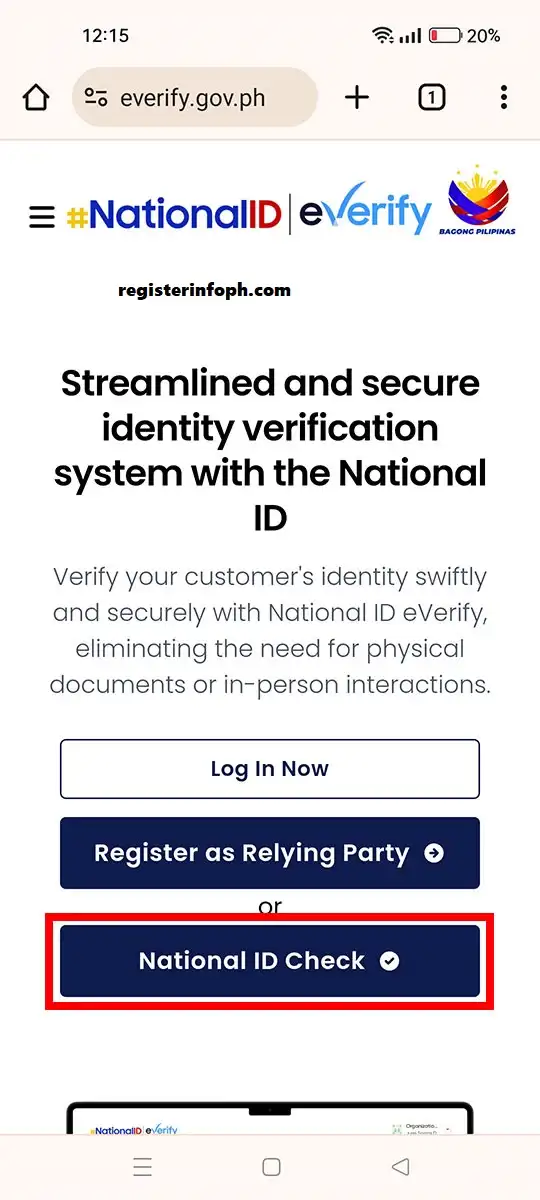
The PSA provides the National ID Check service for authenticating the National ID Digital format.
You can access the official verification service here:
The service can verify the authenticity of the ID by scanning its QR code.
Generally, the verification process involves:
- Open the official National ID Check website.
- Allow camera access if requested.
- Position the QR code within the camera frame.
- Make sure the QR code is clearly visible.
- Allow the system to process the QR code.
- Review the verification result.
If the information returned by the verification system matches the ID being presented, it helps establish that the Digital National ID is authentic.
Is the Digital National ID Valid?
Yes. The PSA has repeatedly stated that the Digital National ID is a valid and sufficient proof of identity and age, subject to proper authentication.
It has the same functionality and validity as other National ID formats. The PSA also states that the National ID does not have an expiration date.
The National ID is therefore not simply a temporary substitute that becomes useless once you receive the physical card. The digital format is an official format of the National ID.
If an institution needs to confirm authenticity, it can use the available National ID authentication services.
Can You Print the Digital National ID on PVC?
No.
You should not print your Digital National ID onto a PVC or plastic card and treat that homemade card as an official National ID card.
The PSA has warned against unauthorized reproduction of the National ID. Only authorized government processes can issue official National ID formats.
Instead of creating your own plastic version, keep the official digital copy accessible through the approved digital channels.
Unauthorized reproduction may also create problems because an establishment may be unable to authenticate an unofficial reproduction as an official National ID format.
What If You Have Not Registered for the National ID?
If you have not yet registered for the National ID, you cannot simply create a digital copy through the online access process.
The digital format is intended for people who are already registered in the National ID System.
You generally need to complete National ID registration through a PhilSys registration process before you can access your digital record.
During registration, the PSA collects the required demographic and biometric information and creates your National ID record.
Depending on your situation, supporting documents may be required. The PSA provides information about acceptable supporting documents through the official PhilSys website.
How to Update Your National ID Information
If your personal information changes or you discover an error in your National ID record, you should not create another registration.
The National ID system provides processes for updating demographic information.
Examples of information that may need updating include:
- Name
- Address
- Civil status
- Other demographic information

The PSA has advised registered individuals to update information when necessary. You should visit a National ID registration center that provides updating services and bring the appropriate supporting documents.
Your National ID registration is not something you should repeat simply because your information needs to be corrected.
What to Do If Your Digital National ID Cannot Be Accessed
Sometimes you may encounter a verification failure, loading problem, or other technical issue when attempting to access your National ID Digital copy.
Try these basic steps first:
Check Your Internet Connection
A weak or unstable connection can interfere with the verification process.
Switch to a more reliable connection and try again.
Check Your Information
Make sure your name and date of birth are entered correctly and match your National ID registration.
Try Again Later
Government websites and applications can occasionally experience heavy traffic or temporary technical issues.
If the service is unavailable, wait and try again later.
Check Your Camera
Facial verification requires your device camera to work properly.
Make sure the camera is not blocked and that your face is clearly visible.
Keep Your App Updated
If you are using eGovPH, check whether an updated version of the application is available.
Contact PhilSys for Assistance
If you continue experiencing problems, use the official PSA and PhilSys channels for assistance rather than giving your personal information to unofficial websites or individuals.
The PSA provides official information and support channels through its PhilSys website and related services.
Digital National ID vs. Physical National ID
Both formats are part of the National ID system, but they differ in how you access them.
|
Feature |
Digital National ID |
Physical National ID |
|---|---|---|
|
Format |
Electronic |
Physical card |
|
Access |
Smartphone/computer |
Physical card |
|
Internet may be needed |
Yes for online access |
No |
|
QR verification |
Yes |
Yes |
|
Proof of identity |
Yes, subject to authentication |
Yes, subject to authentication |
|
Expiration |
No |
No |
|
Easy to carry |
Yes, through your device |
Yes, but must carry the card |
|
Can be lost physically |
Device-dependent |
Yes |
The digital format is especially useful when you do not have your physical card with you.
At the same time, having the physical National ID remains useful, particularly in situations where you do not have internet access or cannot access your phone.
Benefits of Having a Digital National ID
There are several reasons registered Filipinos may want to access their National ID Digital copy.
1. Convenient Access
Your National ID can be available on your smartphone instead of requiring you to carry your physical card everywhere.
2. Useful Backup
If you forget your physical card at home, your digital ID can provide another way to present your identity, subject to authentication.
3. Faster Transactions
Digital access can make identity verification more convenient for participating government agencies and private institutions.
4. Easy Authentication
The QR code provides a mechanism for verifying the authenticity of your digital ID through the official National ID Check service.
5. No Separate Digital Registration
You do not need to apply for a completely separate ID just to obtain the digital format. The digital version is connected to your National ID registration.
6. No Expiration
The PSA states that the Digital National ID does not expire.
7. Useful When the Physical Card Is Not Available
A digital copy can be particularly convenient while waiting for a physical card or when the physical card is not immediately available.
How to Keep Your Digital National ID Secure
Because your National ID contains personal information, security should be a priority.
Follow these precautions:
If someone asks for your National ID, make sure there is a legitimate reason for the request.
Frequently Asked Questions
Final Thoughts
The National ID Digital format gives registered Filipinos a convenient way to access their National ID without depending entirely on the physical card. Through the official National ID services and eGovPH app, eligible registered individuals can access their digital identification using a smartphone or computer.
The National ID Digital version is not merely a picture of your physical card. It is an official format of the National ID with security and authentication features, including a QR code that can be checked through the National ID authentication system.
If you have already registered for the National ID, accessing your National ID Digital copy can be useful for everyday transactions, especially when you do not have your physical card available. Always use official government channels, protect your personal information, and verify your ID through the official authentication services when necessary.
For the latest information about the National ID program, use the official PSA and PhilSys websites rather than relying on unofficial websites or social media posts.
Read also : PSA Online Appointment System: Complete Step-by-Step Guide (2026)
NBI Clearance Renewal Online 2026: Requirements, Fees & How to Renew
NBI Clearance 2026: Online Application, Requirements & Fees