
TM SIM Registration 2026: Easy Online Guide
TM SIM Registration is required for eligible TM users in the Philippines under Republic Act No. 11934, also known as the SIM Registration Act. The registration process verifies the identity of the SIM owner and helps protect mobile users against scams, fraud, and other SIM-related misuse.
If you have a new TM SIM, you need to register it before you can use it. Existing users should also make sure their SIM is properly registered.
The good news is that the process is straightforward. You can register your TM number online through the official Globe SIM registration portal, use the GlobeOne App where available, or visit a Globe retail store for assistance.
This updated guide explains the registration process, required information and IDs, OTP verification, registration status, common problems, and frequently asked questions.
If you’re looking for more step-by-step guides on Philippine government services and online portals, visit RegisterInfoPH for the latest tutorials and updates.
What Is TM SIM Registration?
TM SIM Registration is the identity-verification process used to associate a TM mobile number with its registered owner.
During registration, you provide information such as your name, date of birth, gender, address, and nationality. You also need a valid government-issued photo ID, and the online process includes identity verification steps such as a selfie.
The Philippine SIM Registration Act applies to SIM cards and eSIMs used for mobile phones and certain other devices. Globe states that registration is intended to help address scams, smishing, fraud, and other illegal activities involving anonymous SIM cards.
Is TM SIM Registration Required?
Yes. SIM registration is required under the SIM Registration Act.
For new SIMs, Globe says registration is required before activation. A new SIM can be registered immediately, while the packaging also contains the applicable expiry information if the SIM is not going to be used right away.
If a SIM is not registered as required, it can be deactivated and mobile services such as calls, texts, and mobile internet may become unavailable.
Where Can I Register My TM SIM?
TM users can use the official Globe SIM registration system to complete the process online.
The main options are:
- Official SIM registration portal
- GlobeOne App
- Globe retail stores
Globe’s official information specifically lists the online registration portal, GlobeOne App, and Globe retail stores as registration options.
Official TM SIM Registration Link
The safest option is to use the official Globe SIM registration portal:
The official portal currently provides options to verify a mobile number, choose the registration type, provide an ID and selfie, complete the registration form, and review the submitted information.
Important: Avoid unofficial websites that ask for your personal information, OTP, or ID details.
How to Register TM SIM Online
The online process can be completed in a few main stages. Prepare your TM number, valid ID, and personal information before starting.
Step 1: Open the Official Registration Portal
Visit the official Globe SIM registration website:
Make sure you are using the official Globe domain before entering your personal information.
Step 2: Enter Your TM Mobile Number
Enter the mobile number associated with your TM SIM.
Check the number carefully before continuing because the OTP will be sent to that number.
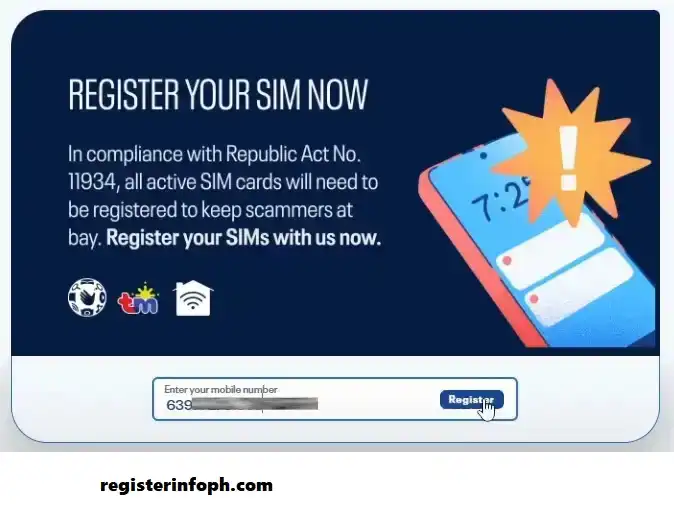
For eligible prepaid registrations, Globe’s process asks users to enter their mobile number and request an OTP.
Step 3: Request and Enter the OTP
After entering your number, request the One-Time PIN.
The OTP will be sent through SMS to your TM number.
Enter the code on the registration page.
Globe’s registration instructions state that the OTP is time-limited, so enter it promptly.
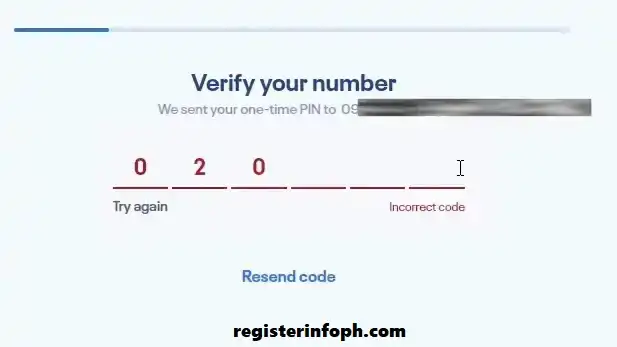
If you do not receive the code, check your signal and make sure your SIM can receive SMS messages before requesting another OTP.
Step 4: Choose the Appropriate Registration Type
The registration portal will ask you to select the type of registration that applies to you.
Follow the instructions displayed on the official website rather than relying on screenshots or instructions from unofficial websites, because the portal interface can change.

Step 5: Provide Your Personal Information
Complete the required registration form.
You may be asked for:
- Full name
- Date of birth
- Gender or sex
- Nationality
- Complete address
- Government ID type
- Government ID number

Make sure the information you enter is accurate and matches your identification document.
Globe lists these details among the information required for SIM registration.
Step 6: Upload Your Valid ID
Select the appropriate government-issued ID and upload a clear image.
Your ID should be:
- Valid and not expired
- Clearly readable
- Not blurred
- Not unnecessarily cropped
- Consistent with the information you entered
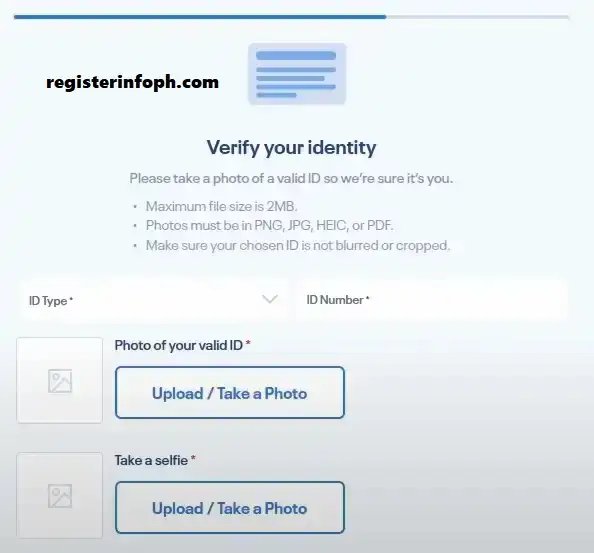
Globe’s official registration guidance says the uploaded ID must be clear and readable and provides specific accepted-ID requirements.
Step 7: Complete Selfie Verification
The online registration process also asks you to take a selfie for identity verification.
For a successful verification:
- Use a well-lit area.
- Face the camera directly.
- Make sure your face is clearly visible.
- Avoid face filters.
- Remove accessories that could interfere with verification.
- Make sure the selfie matches the photo on your ID.
These are consistent with Globe’s published selfie and ID-upload guidelines.
Step 8: Review Your Details
Before submitting the form, carefully check everything.
Pay particular attention to:
- Name spelling
- Birth date
- Address
- Nationality
- ID information
- Mobile number
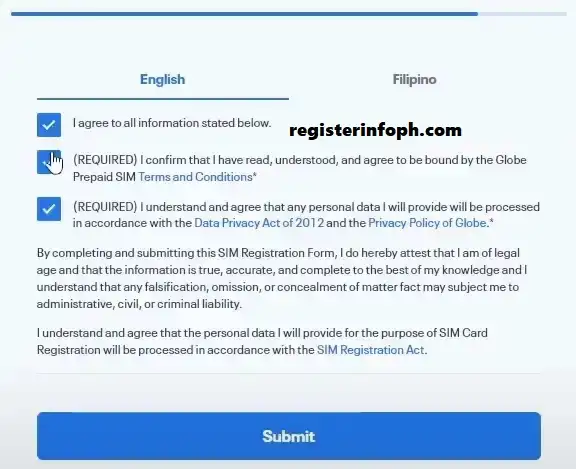
Incorrect information can cause problems during verification.
Step 9: Submit the Registration
Once everything is correct, submit the form.
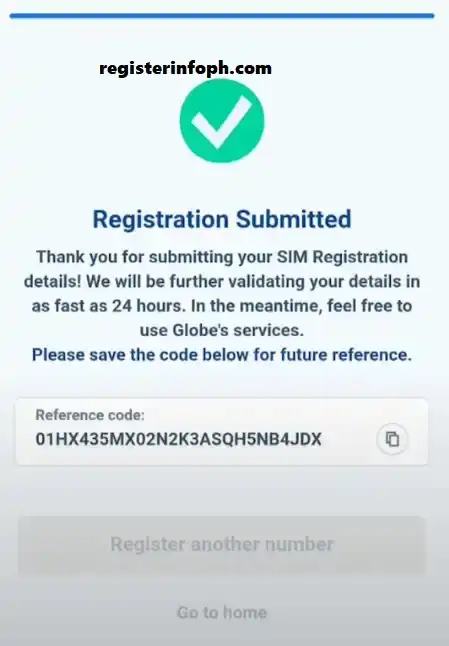
After successful completion, the system provides a reference number. Save it or take a screenshot so you have a record of your registration.
Globe specifically recommends keeping the reference number as proof of registration.

Register your TM SIM today and keep your mobile number ready to use.
How to Register Through the GlobeOne App
Another convenient option is the GlobeOne App.
Globe identifies GlobeOne as one of its official channels for SIM registration.
The exact appearance of the app can change with updates, but the general process is:
- Open the GlobeOne App.
- Sign in or set up your account.
- Select the SIM registration option.

- Choose or enter your TM mobile number.
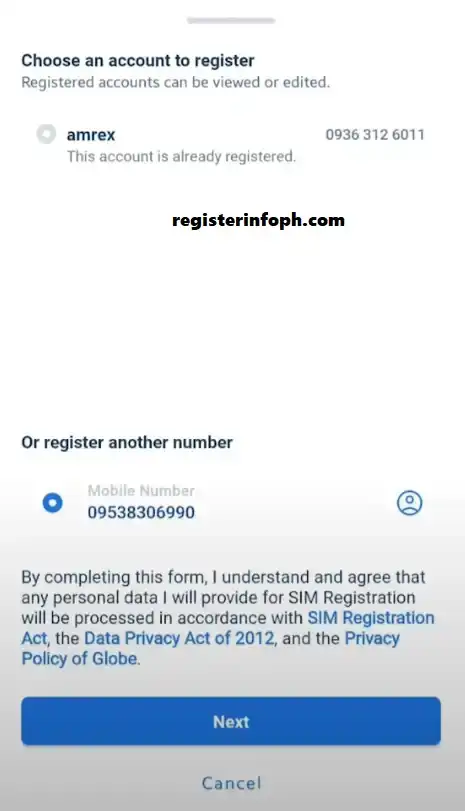
- Complete OTP verification.
- Provide the requested personal information.

- Submit the required ID.
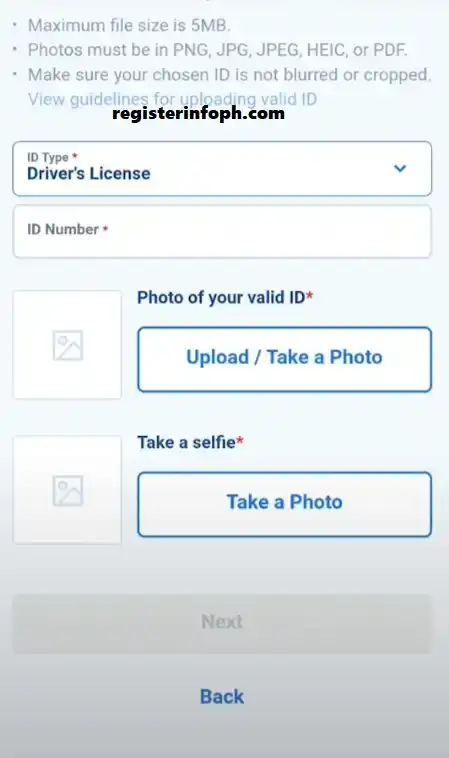
- Complete identity or selfie verification if requested.

- Review your information.
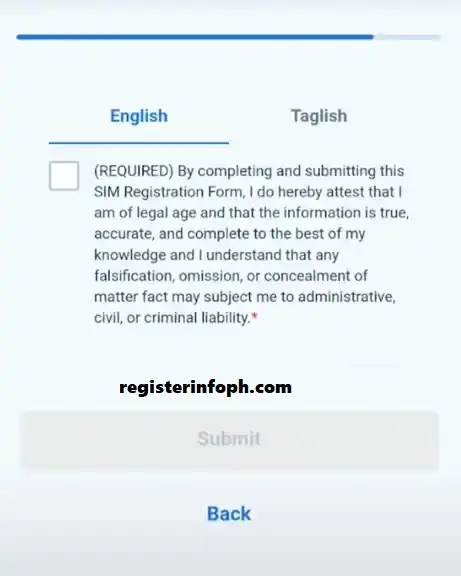
- Submit the registration.
Always install the app through an official app store and make sure you are using the legitimate GlobeOne application.
Can I Register My TM SIM at a Globe Store?
Yes. If you have difficulty completing the online process, you can visit a Globe retail store for assistance.
Globe officially lists its retail stores as an option for SIM registration.
Bring your:
- TM SIM or mobile number
- Valid government-issued ID
- Any additional documents required for your specific registration type
Store personnel can explain the applicable process and help if you encounter problems with online verification.
What Information Do I Need?
Before starting, prepare the information required by the registration system.
For an individual user, this generally includes:
|
Requirement |
Purpose |
|---|---|
|
Full name |
Identifies the SIM owner |
|
Date of birth |
Verifies identity |
|
Gender/Sex |
Registration information |
|
Nationality |
Identifies the subscriber |
|
Address |
Records subscriber information |
|
TM mobile number |
Identifies the SIM |
|
Government-issued ID |
Verifies identity |
|
Selfie |
Supports identity verification |
Globe’s official FAQ confirms the core personal-information and ID requirements.
What IDs Are Accepted for TM SIM Registration?
The accepted IDs can include government-issued identification such as:
- Passport
- Driver’s License
- National ID
- BIR ID or TIN ID
- UMID Card
- PhilPost Postal ID
- SSS ID
- PRC ID
Globe’s official resources list these among the IDs accepted for SIM registration.
The exact accepted-document list and upload requirements should always be checked on the official registration portal before submission.
ID Upload Requirements
Your ID image should be clear enough for the system to read the information.
Avoid submitting:
- Expired IDs
- Blurry photographs
- Heavily cropped documents
- Edited or altered documents
- Images where important information cannot be read
Globe’s registration guidance also specifies supported image formats and file-size limits on its registration page.
TM SIM Registration for Minors
A SIM used by a minor has a different registration arrangement.
According to Globe’s SIM Registration Act FAQ, a SIM belonging to a minor must be registered under the name of the parent or legal guardian.
If you are registering a SIM for a child, follow the current instructions shown on the official portal and prepare the required documents for the parent or guardian.
Explore our latest posts to discover more guides on SIM registration, government services, and online portals.
TM SIM Registration for Foreign Nationals
Foreign nationals are also covered by the SIM Registration Act.
Globe states that foreign nationals using Philippine SIMs must register them. Tourists have additional requirements, including a passport, proof of address in the Philippines, and a return ticket or ticket to another destination. Tourist SIM registration is valid for 30 days according to Globe’s current FAQ.
Foreign nationals staying in the Philippines under other visa types may need additional documents, such as an ACRI-Card and applicable employment, school, or other supporting documents.
Is TM SIM Registration Free?
Yes. Globe states that its online SIM registration is free and zero-rated, meaning users do not have to pay a registration fee for the online process.
Be careful if an unofficial website or individual asks you to pay simply to register your SIM.
Always use the official registration channels.
How Do I Know If My TM SIM Is Registered?
After submitting your details, the registration system provides confirmation and a reference number when the registration is successfully completed.
Keep this reference number for your records.
If you are uncertain about the status of your number, use the official Globe registration system or contact Globe/TM support rather than entering your information into an unknown website.
What Is the TM SIM Registration Reference Number?
The reference number is the confirmation number generated after a successful online registration.
It is useful as proof that you completed the process.
For this reason, do not close the page without saving the number. You can take a screenshot or store the number somewhere secure.
Globe’s official registration instructions specifically advise users to keep the reference number.
Common TM SIM Registration Problems and Solutions
Some users may experience difficulties during registration. Most issues are related to incorrect information, verification, connectivity, or technical problems.
OTP Not Received
If the OTP does not arrive:
- Check that your TM number is correct.
- Make sure your SIM has network coverage.
- Confirm that the SIM can receive SMS.
- Wait briefly before requesting another OTP.
- Try again later if the service is temporarily busy.
Avoid repeatedly requesting codes in a short period.
Registration Website Is Not Working
A temporary technical problem can prevent the page from loading or completing the registration.
Try:
- Checking your internet connection
- Reloading the page
- Using another browser
- Clearing temporary browser data
- Trying again later
Always return to the official registration portal rather than switching to an unknown website.
ID Verification Failed
An ID may fail verification if the image is unclear or the details do not match.
Try again with a valid, unexpired ID and make sure the entire relevant information is readable.
Selfie Verification Failed
Take another selfie in a well-lit area.
Look directly at the camera and avoid filters, masks, caps, or other items that may interfere with facial verification.
Wrong Personal Information
If you entered incorrect details, check the official options for updating your registration information.
Globe’s official SIM registration portal currently includes an Update Registration Details option.
How to Update TM SIM Registration Details
If your registration information needs to be corrected, use the official Globe SIM registration system.
The current registration portal includes an option to Update Registration Details.
If the online option does not resolve your issue, Globe’s FAQ advises customers who want to change their information to visit a Globe store.
Bring your valid identification document when requesting assistance.
Can I Register More Than One TM SIM?
Yes. If you have multiple SIMs, each SIM needs to be registered individually.
Globe states that multiple SIMs can be registered, but each one must be registered under the owner’s name.
For example, if you have three TM numbers, you should complete the registration process separately for each number.
What Happens If I Do Not Register My TM SIM?
Failure to comply with SIM registration requirements can result in deactivation.
Once a SIM has been deactivated, services such as calls, text messages, mobile internet, and other related services may no longer be available.
For new SIMs, registration is required before activation.
Does Registration Stop My TM SIM From Expiring?
No.
SIM registration and SIM expiration are different things.
Registering your SIM makes it compliant with the registration requirement, but prepaid SIMs can still have their own validity or expiration rules. Globe specifically states that registration does not prevent a SIM from expiring and that users still need to keep their prepaid SIM active.
TM SIM Registration and Mobile Number Portability
If you move your number from another network to TM through Mobile Number Portability, registration requirements can still apply.
Globe states that customers who transfer to Globe via MNP need to register their prepaid SIM again through the online registration portal.
If you are switching networks while keeping your existing number, follow the current instructions provided by the receiving network.
TM SIM Registration Safety Tips
Your SIM registration involves personal information and identification documents, so security is important.
Follow these tips:
Use Only Official Channels
Start from the official Globe/TM registration portal or GlobeOne App.
Never Share Your OTP
Your OTP is used to verify your mobile number. Do not give it to another person or enter it on an unofficial website.
Protect Your ID
Only upload your identification document through the official registration system.
Check the Website Address
Before entering personal information, verify that you are on an official Globe website.
Save Your Reference Number
Keep your registration reference number somewhere safe in case you need proof of registration later.
Quick TM SIM Registration Checklist
Before submitting your registration, make sure you have:
Frequently Asked Questions
Final Thoughts
Completing TM SIM Registration is an important step for eligible TM users in the Philippines. The process can be completed online by verifying your mobile number, entering your personal information, providing an accepted ID, completing identity verification, and submitting the form.
The official Globe registration system is the safest place to begin. Registration is free online, and users can also use the GlobeOne App or visit a Globe retail store when they need assistance.
Before submitting your application, double-check your personal information and make sure your ID and selfie are clear. After successful registration, save the reference number for your records.
Ready to complete your registration?
Stay connected, keep your information secure, and use only official TM/Globe channels for SIM-related services.