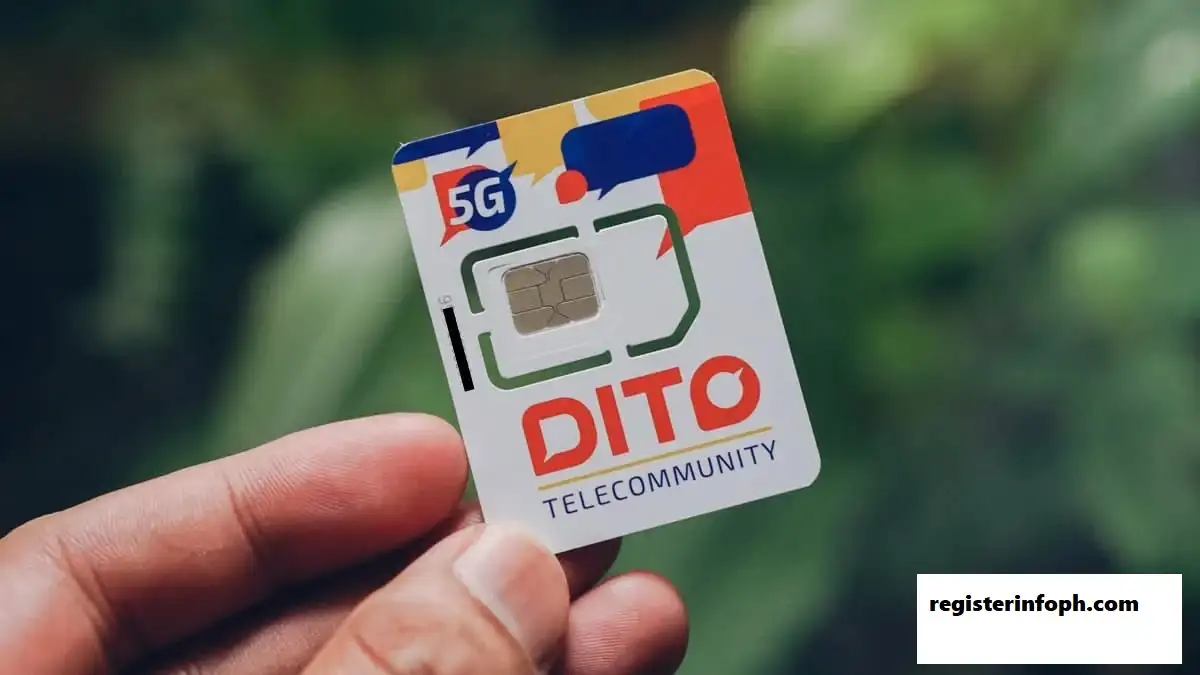
DITO SIM Registration is required for DITO subscribers in the Philippines under the SIM Registration Act. Whether you have recently purchased a DITO SIM or are registering an existing number, completing the registration helps keep your mobile services active and links the SIM to verified subscriber information.
The registration process can be completed through available DITO registration channels, including the DITO app and online registration options. Depending on your subscriber type, you may also need to provide a valid government-issued ID, personal information, and other supporting details.
This guide explains how to register DITO SIM, what requirements you need, how to activate your SIM, how registration works for minors and foreigners, and what to do if you encounter problems.

What Is DITO SIM Registration?
DITO SIM Registration is the process of submitting your personal information and identification details to register your DITO mobile number under the Philippine SIM Registration Act.
The purpose of SIM registration is to help prevent fraudulent activities, scams, and the misuse of mobile numbers. Registration also allows telecommunications providers to maintain verified subscriber records.
For DITO users, completing the registration is important because an unregistered SIM may eventually lose access to mobile services.
How Can You Register a DITO SIM?
If you want to know how to register DITO SIM, you can complete the process through the available DITO registration channels. Depending on your SIM and device, the main options include:
- DITO Website Registration
- DITO App Registration
- DITO SMS Registration, when available
Before starting your DITO SIM registration, make sure your phone is compatible with the DITO network. Having your SIM and required identification documents ready can also make the process easier.
Register DITO SIM Through the Official Website
The DITO website can be used to begin the SIM registration process. Depending on the current registration system, you may be directed to the DITO app to complete the identity verification process.
Follow these steps:
- Visit the official DITO website and find the SIM Registration option.
- Select the registration option provided by DITO.
- Follow the instructions displayed on the page.
- If a QR code appears, scan it with your mobile phone.
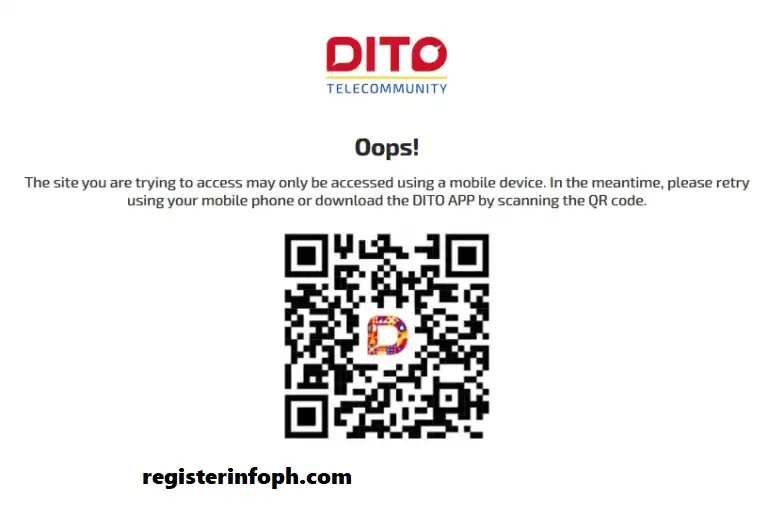
- Continue the registration through the official DITO app if you are redirected there.
The website method is useful for starting the registration process, while the app may handle the required verification steps.
For more helpful guides and updates about Philippine government and telecom services, visit RegisterInfoPH
Register Your DITO SIM Through SMS
SMS registration may be available for some DITO subscribers. If your SIM qualifies for this method, DITO can send a registration link to your mobile number.
Keep in mind that SMS registration may not be available for every SIM or device.
To register through SMS:
- Insert your new DITO SIM into your phone.
- Complete the required SIM activation process.
- Wait for an SMS containing your DITO SIM registration link.
- Open the link and enter the requested details, such as your name, address, and identification information.

- Enter the OTP sent to your DITO number.
- Check your information carefully.
- Tap “Register” to submit the form.
After successful registration, follow any additional instructions provided by DITO to complete your SIM activation.
Want to explore more recently published guides? Check out our Latest Posts for the newest updates and helpful articles.
Complete DITO SIM Registration Using the DITO App
The DITO app provides a convenient way to complete your SIM registration directly from your smartphone. The process allows you to submit your personal information, identification document, selfie verification, and OTP from one place.
Download and Open the Official DITO App
Install the official DITO app from the appropriate app store for your Android or iOS device.


Once installed, open the application and log in if required.
Follow the DITO App Registration Steps
After opening the app:
- Look for the “Register Here” option on the dashboard.
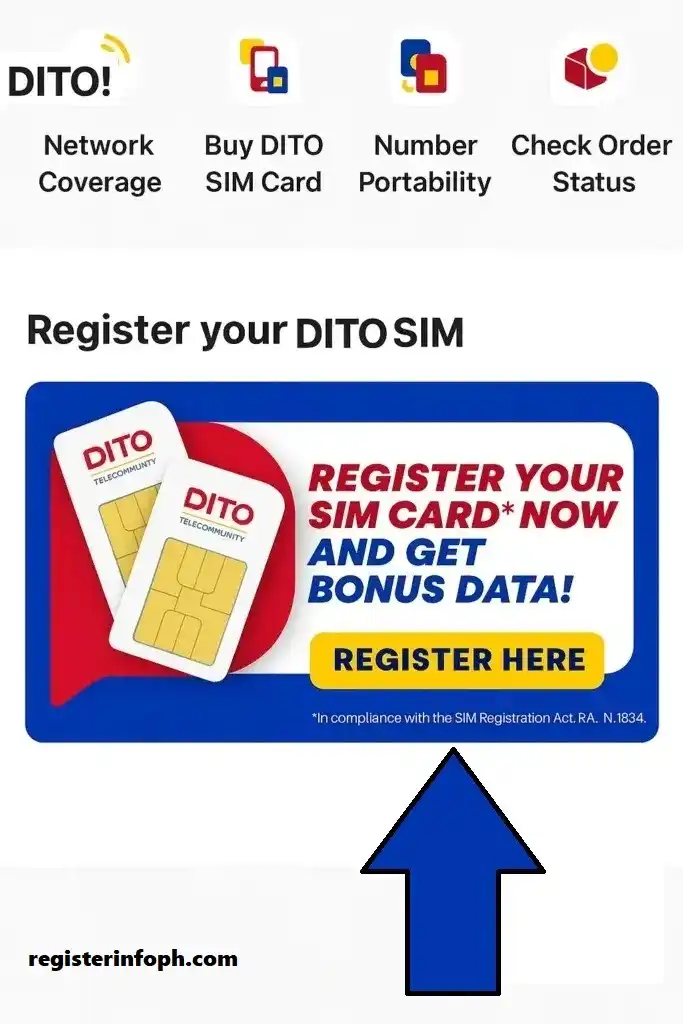
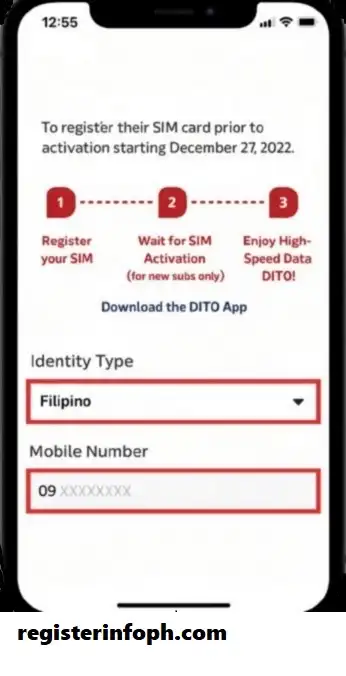
- Select your appropriate Identity Type, such as Filipino, Minor, or Foreign National.
- Enter your DITO mobile number.
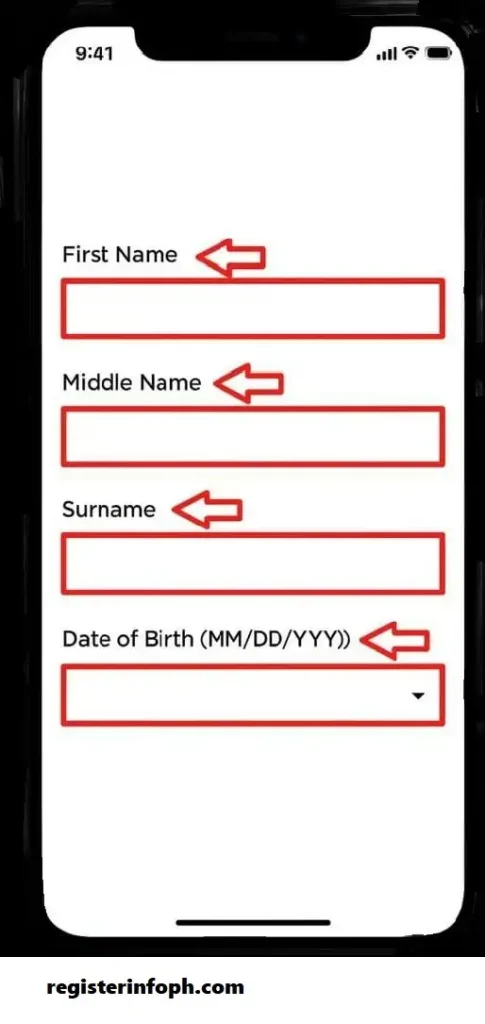
- Provide your requested personal information, including your name, date of birth, gender, and address.
- Upload a clear image of your government-issued ID.
- Take or upload the required selfie photo for identity verification.
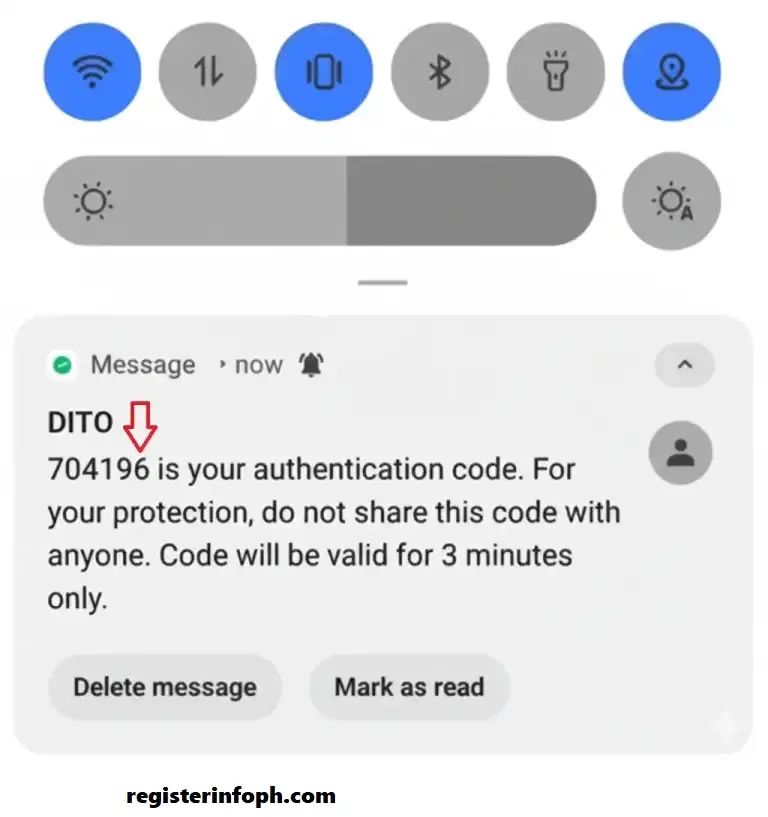
- Select “Get OTP” for your mobile number.

- Enter the OTP received through SMS.
- Review all your information carefully.
- Select “I Agree” after reviewing the applicable terms.
- Tap “Submit” to send your registration.
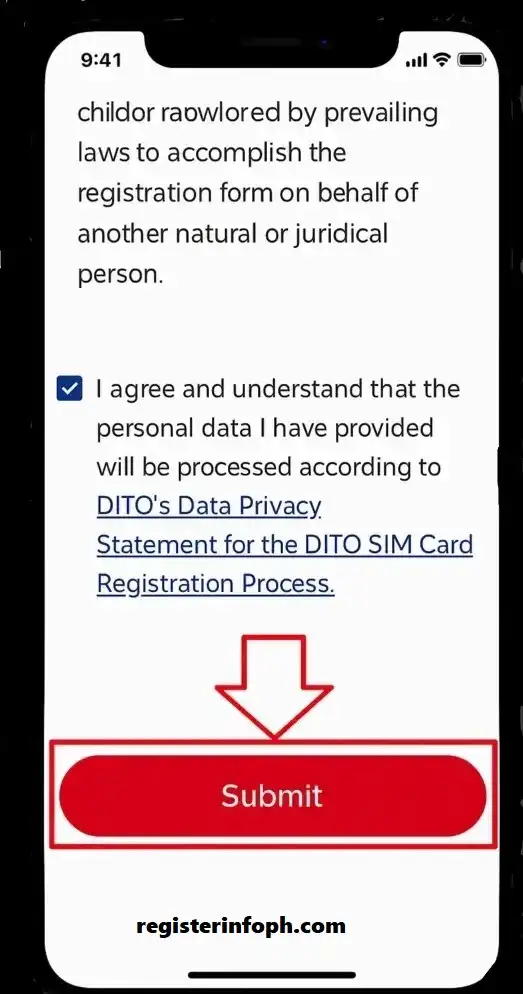
DITO SIM Registration Successfully Submitted
After submitting your details, wait for the registration confirmation or status provided by DITO.
Once your registration is approved, keep the confirmation for your records. If you experience any issue, use DITO’s official support channels rather than third-party registration websites.
How to Activate DITO SIM
SIM registration and SIM activation are related but are not exactly the same process.
After inserting a DITO SIM into a compatible phone, you may need to activate it before using mobile services.
The supplied DITO guide describes three activation triggers:
- Send an SMS to a valid number
- Make a call to a valid number
- Turn on mobile data
Simple Activation Process
Step 1: Insert the DITO SIM into your phone.
Step 2: Turn on your phone and allow the network to connect.
Step 3: Trigger activation using an available method.
Step 4: Wait for the activation or welcome confirmation.
If your SIM does not activate, check whether your device is compatible with the DITO network and contact DITO support if necessary.
Why Do You Need to Register Your DITO SIM?
Registering your DITO SIM provides several important benefits:
- Helps keep your mobile services active
- Links your SIM to verified subscriber information
- Helps protect your mobile number from unauthorized use
- Supports efforts to reduce SIM-related fraud and scams
- Makes it easier to verify ownership of your number
- Helps DITO provide customer support when account verification is required
- Keeps your SIM compliant with Philippine telecommunications regulations
If you have a new DITO SIM, it is best to complete the registration process as soon as required.
DITO SIM Registration Requirements
Before starting your DITO SIM registration, prepare the information and documents you may need.
Basic Requirements
Depending on your registration type, you may need:
- Your DITO mobile number
- Full name
- Date of birth
- Address
- Gender and other requested personal information
- Valid government-issued ID
- Selfie or facial verification when requested
- OTP sent to your DITO mobile number
- Additional supporting information for special registration categories
Make sure the information you enter matches your identification documents. Blurry ID photos, incorrect details, or incomplete information can cause problems during verification.
Who Can Register a DITO SIM?
DITO SIM registration is available to different types of subscribers, including:
- Filipino citizens
- Minors
- Foreign nationals
- Tourists
- Businesses and corporate entities
- Prepaid subscribers
- Postpaid subscribers
The documents and verification requirements can differ depending on the type of registrant.
DITO SIM Registration for Minors
Minors may have additional registration requirements because the registration involves a parent or legal guardian.
The supplied guide explains that a parent or legal guardian’s valid government-issued ID may be required.
General Steps for Minor Registration
- Open the DITO registration portal or applicable registration channel.
- Select Minor as the registrant type.
- Enter the mobile number.
- Complete SMS verification.
- Provide the parent’s or legal guardian’s valid ID.
- Complete the requested selfie or identity verification.
- Enter the required details of the minor and guardian.
- Review the registration information.
- Submit the registration.
Make sure the documents and photographs are clear and readable.
DITO SIM Registration for Foreigners and Tourists
Foreign nationals using DITO services in the Philippines may have different documentation requirements from Filipino citizens.
The supplied source identifies foreign nationals and tourists as eligible DITO SIM users and includes them among the registration categories.
Depending on the registration process, a foreign subscriber may need to provide identification and information related to their stay in the Philippines.
Before registering, prepare your passport and any other supporting documents requested by DITO.
DITO SIM Registration for Businesses
Businesses and corporate entities using DITO services may also need to register their SIMs.
Business registrations can involve additional company or authorized-representative information. If you are registering SIMs on behalf of an organization, follow the requirements provided by DITO for business subscribers.
DITO SIM Registration Tips
A few simple precautions can help prevent registration errors.
1. Use a Clear ID Photo
Make sure your government-issued ID is clearly visible and readable.
2. Take a Clear Selfie
If selfie verification is required, use good lighting and make sure your face is clearly visible.
3. Check Your Information
Review all information before submitting your form.
4. Keep Images Within the Required Size
The supplied guide recommends keeping uploaded images below 2 MB to avoid upload problems.
5. Keep Your Confirmation
Save your registration confirmation for future reference.
6. Never Share Your OTP
Your OTP is used for verification. Do not give it to anyone claiming to be a DITO representative.
7. Use Official DITO Channels
Avoid entering your personal information on suspicious registration websites or links.
DITO SIM Registration App Download
To use the app-based registration process:
- Open the official app store on your Android or iOS device.
- Search for the DITO app.
- Check that you are downloading the official application.
- Install the app.
- Open the application.
- Log in or follow the registration instructions.
- Select the SIM registration option.
The supplied guide provides links to the Google Play Store and Apple App Store versions of the DITO application.
DITO SIM Registration Rewards
The supplied DITO guide states that newly registered users may receive a data reward and that customers can earn loyalty points through certain DITO payment partners and promotions.
Because promotional offers can change, always check the latest terms displayed by DITO before relying on a specific reward.
Types of DITO SIM Cards
DITO offers different SIM options for different types of users.
Regular SIM
A regular SIM is designed for standard mobile phone use.
Data-Only SIM
A data-only SIM can be useful for compatible tablets, mobile Wi-Fi devices, and other data-focused devices.
eSIM
An eSIM allows compatible devices to use mobile services without inserting a traditional physical SIM card.
Availability and device compatibility can vary, so check the current DITO requirements before purchasing.
Why Choose DITO SIM?
DITO is one of the major telecommunications providers in the Philippines and offers services designed for compatible devices and coverage areas.
The supplied guide highlights features including:
However, network availability and performance can vary depending on your location, device, network conditions, and current DITO service availability.
DITO vs Globe vs Smart
DITO competes with other major Philippine telecommunications providers such as Globe and Smart.
|
Feature |
DITO |
Globe |
Smart |
|---|---|---|---|
|
Network |
4G/5G |
2G/3G/4G/5G |
2G/3G/4G/5G |
|
Coverage |
Expanding |
Nationwide |
Nationwide |
|
Data Promos |
Competitive |
Varied |
Varied |
|
SIM Registration |
Required |
Required |
Required |
The supplied source uses this comparison to summarize the major differences between the providers.
Common DITO SIM Registration Problems and Solutions
Sometimes registration or activation does not work as expected. Here are some common issues and possible steps to try.
Registration Photos Won’t Upload
If your ID or selfie cannot be uploaded:
The supplied guide specifically recommends checking image clarity and keeping uploaded photos below 2 MB.
DITO SIM Has No Signal
If your DITO SIM is not connecting:
DITO Internet Is Slow
If mobile data is slow:
Unable to Make Calls
If calls are not working:
DITO Customer Support
If you cannot resolve a registration or activation issue yourself, contact DITO through its official customer support channels.
The supplied guide lists the following contact information:
DITO Hotline
185
Customer Service Number
0991 481 4225
Official Website
DITO.ph
For the latest contact information, always verify the details through DITO’s official channels.
Security Tips for DITO SIM Registration
SIM registration involves personal information, so security should be a priority.
Follow these precautions:
- Never share your OTP.
- Do not upload fake or altered identification documents.
- Use only official DITO registration channels.
- Keep your registration confirmation.
- Avoid suspicious links sent through messages or social media.
- Do not provide your personal information to unknown individuals.
- Check the website or application before entering sensitive information.
These precautions are also highlighted in the supplied DITO guide.
Benefits of DITO SIM Registration
Completing your registration provides several practical benefits.
Prevents Service Interruption
Registering your SIM helps you comply with the applicable SIM registration requirements and avoid issues associated with an unregistered number.
Protects Your Mobile Identity
Registration connects the SIM with verified subscriber information, helping reduce anonymous SIM usage.
Helps With SIM Recovery
A verified subscriber record can help establish ownership when you need assistance with a lost or damaged SIM.
Improves Account Verification
Registration information can be used when DITO needs to verify your account.
Supports Anti-Fraud Measures
SIM registration is intended to help reduce fraud, scams, and other illegal activities involving mobile numbers.
Frequently Asked Questions
Final Thoughts
DITO SIM Registration is an important step for DITO subscribers in the Philippines. Whether you choose the DITO app, online registration, or another available registration method, the key is to provide accurate information and complete the required identity verification.
Before starting, prepare your DITO mobile number, valid identification, personal information, and any additional documents required for your subscriber category.
If you experience problems such as failed photo uploads, activation issues, no signal, or registration errors, check your information and try the recommended troubleshooting steps before contacting DITO customer support.
Most importantly, use official DITO channels only and never share your OTP or personal information with unauthorized individuals.
Disclaimer: This article is for informational purposes only. DITO registration requirements, procedures, promotions, fees, and available registration channels may change. Always verify the latest information through official DITO channels before submitting personal information or completing a registration.